
Car key battery replacement is one of the easiest jobs a driver can do at home. It usually takes under five minutes, costs a few pounds and needs nothing more than a small screwdriver. This guide explains how to change a car key battery yourself, what to buy, and what to do if the fob still misbehaves afterwards.
At Rapid Lock Services we see plenty of drivers across the UK who assume a flat fob means an expensive replacement key. In most cases it is just a tired coin cell.
Signs Your Car Key Battery Is Dying
Key fob batteries rarely fail without warning. Watch for these signals:
- Reduced range: you have to stand right next to the car before it locks or unlocks.
- Repeated button presses: the fob works only on the second or third try.
- Warning message: many cars show a low key battery message on the dashboard.
- Keyless entry problems: the doors do not respond when you touch the handle.
- Push-button start issues: the car will not start unless you hold the fob against the start button.
- Dim or no LED: the small light on the fob is weak or silent when you press a button.
If you ignore these signs the fob can eventually stop working altogether. Our guide on whether a dead key fob battery stops your car starting explains what happens when it goes completely flat.
What You Need Before You Start
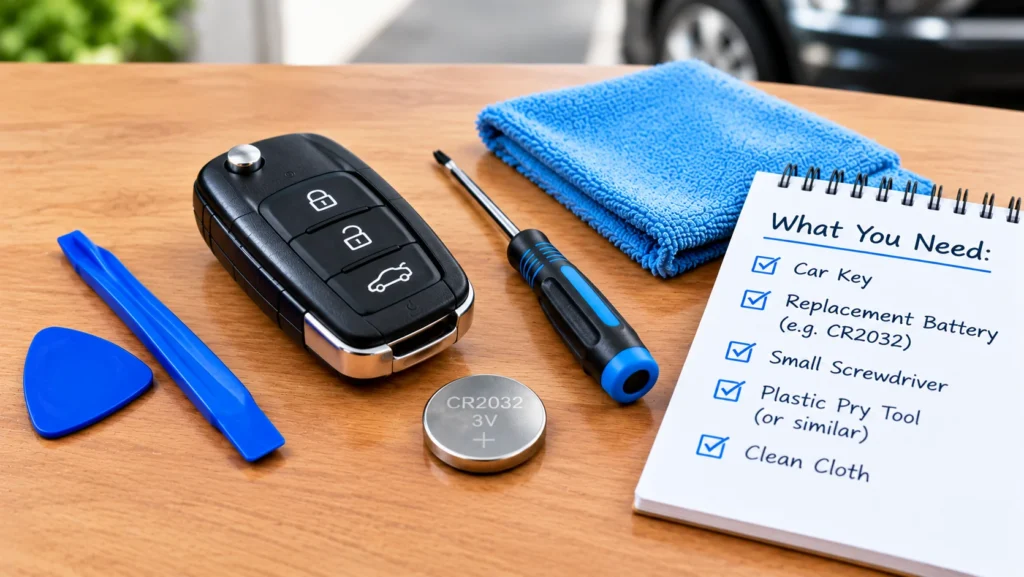
Gather everything first so you do not lose tiny parts:
- A replacement battery of the correct type (check below).
- A small flathead screwdriver, a thin coin or a plastic trim tool.
- A soft cloth or towel to protect the fob casing from scratches.
- A clean, well-lit surface with a tray or cloth so small parts cannot roll away.
Use the old battery as your reference. Note which way up it sits before you remove it.
Common Battery Types and Sizes
The most common key fob battery type is the CR2032 car key battery, a 3-volt lithium coin cell about 20mm across and 3.2mm thick. Many fobs use it, but not all.
- CR2032: very common on many modern remote and smart keys.
- CR2025: same width but thinner. It can fit in some fobs but may give a loose connection.
- CR2016: smaller and thinner, found in some slimmer fobs.
- CR1620 and CR1616: smaller cells used in compact remotes.
- CR2450: larger cell found on some larger smart keys.
What battery does my car key use?
Open the fob and read the code printed on the flat face of the old battery. You can also check your owner’s handbook. Do not guess by size alone, because a thinner or thicker cell can cause poor contact. Buy a reputable brand, as cheap cells can fade quickly.
How to Open a Key Fob Safely
Fobs open in a few different ways, so look closely before applying force.
- Look for a release catch. Many smart keys have a small slide switch that releases the metal emergency blade. Remove it first.
- Find the seam. Most fobs are two plastic halves clipped together. Look for a small notch along the edge or inside the blade slot.
- Check for screws. Some fobs have a tiny Phillips screw hidden under a cover or inside the key ring area.
- Twist gently. Insert a screwdriver or coin into the notch and twist rather than prying. This separates the clips with less risk of cracking the case.
Work slowly and avoid touching the circuit board. Do not press on the rubber buttons pad more than needed, as it can tear.
Step-by-Step Battery Replacement
Here is how to change a car key fob battery:
- Open the fob using the method above.
- Note the orientation of the old battery. Usually the positive (+) side faces up, but confirm on your own fob.
- Lift the battery out with a plastic tool or fingernail. Avoid metal tools that might bend the contacts.
- Hold the new battery by its edges to keep skin oils off the surfaces, then slot it in the same way round.
- Check that the contacts hold the cell firmly.
- Snap the two halves back together, refit any screw and reinsert the emergency blade.
- Test the lock, unlock and boot buttons close to the car, then at a normal distance.
How often to replace car key battery
A typical key fob battery lasts around two to four years, depending on how often you use the fob and whether the car has keyless entry. Smart keys that are constantly searching for the car can drain faster. If you keep your keys near the car, our advice on car key advice covers storing them sensibly overnight.
What to Do If the Key Still Does Not Work
If your key fob is not working after a battery change, run through these checks:
- Orientation: the battery may be upside down. Reopen and check.
- Wrong battery: confirm the code matches the original.
- Dirty or bent contacts: gently clean with a dry cloth and make sure the metal tabs touch the cell.
- Poorly seated circuit board: make sure the board sits flat in the case.
- Faulty new battery: try another fresh cell.
- Needs resyncing: some cars need a reprogramming step. Try unlocking with the physical blade, getting in and switching the ignition on, then test the fob. Your handbook may list a specific procedure.
- Signal interference: try the fob in a different location, away from strong radio sources.
If the fob has been dropped or got wet, the transponder chip or circuit board may be damaged, and a new battery will not fix it.
When to Get a Professional
Call a specialist if the fob case is cracked, the buttons are worn through, the board is damaged, or the car still will not recognise the key after fresh batteries and the checks above. If you have lost the key altogether, see our guide on what to do if you lose your car keys and have no spare.
Rapid Lock Services handles key fob battery replacement, car key replacement and emergency car unlocking, including brands such as Mercedes, Vauxhall, Hyundai and Nissan. For more practical guides, browse our blog, or get in touch to book help with your fob today.
Quick Tips to Make the Battery Last
- Keep the fob away from heat, damp and strong magnets.
- Avoid pressing buttons needlessly in your pocket.
- Buy a spare cell and keep it at home so you are never caught out.
- Replace the battery at the first sign of weak range rather than waiting for failure.